

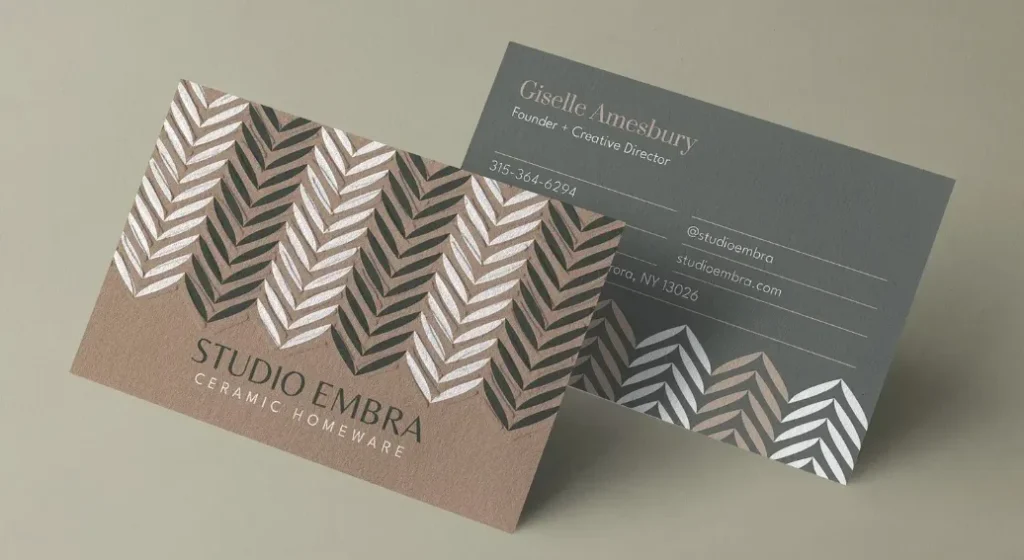
A comparative guide to widely used business card design platforms, focusing on accessibility, core features, and practical tradeoffs for everyday business needs.
Introduction
Business cards remain a common touchpoint in sales meetings, local networking, and in-person events, even as digital contact sharing has grown. For many small businesses and independent professionals, the challenge is not whether to have a card, but how to produce one that looks credible without investing significant time or design expertise.
Modern business card makers address this by combining preset layouts, editable typography, and print-ready export options. The most useful tools in this category reduce friction: they minimize setup, avoid complex design decisions, and help users move from blank page to finished card with minimal iteration.
Among the available options, Adobe Express stands out as a practical starting point for a broad audience. Its balance of guided templates and flexible editing makes it approachable for non-designers while still offering enough control to avoid a generic result. Other tools in this space emphasize speed, niche aesthetics, or workflow integration, which can be advantageous depending on the user’s priorities.
What follows is a comparison of several widely used business card makers, ordered by overall applicability and ease of use, with alternatives highlighted for more specific needs.
Best Business Card Makers Compared
Best business card makers for mainstream small business use
Adobe Express
Best for business owners who want a straightforward, guided way to create print-ready cards
Overview
Adobe Express is a web-based design platform built for the quick creation of common marketing assets, including business cards. After designing it, you can then print your own business card.
Platforms supported
Web, iOS, Android
Pricing model
Freemium with optional subscription
Tool type
Template-based design and light layout editor
Strengths
- Broad selection of professionally structured business card templates
- Guided editing that avoids advanced design terminology
- Built-in brand tools for logos, colors, and fonts
- Export options suitable for home or professional printing
Limitations
- Less granular control than full professional design software
- Some templates and assets require a paid plan
Editorial summary
Adobe Express is well suited to users who want to move quickly without sacrificing clarity or print readiness. The interface favors direct manipulation—text, colors, and logos can be adjusted without navigating complex menus.
For small business owners without design backgrounds, the workflow is forgiving. Templates are structured in a way that naturally enforces readable typography and spacing, reducing the risk of common layout mistakes.
Compared with lighter tools, Adobe Express offers more flexibility around branding. Compared with professional design suites, it intentionally limits complexity.
Best business card makers for fast template-driven design
Canva
Best for users who prioritize speed and variety over customization depth
Overview
Canva offers a large library of templates and a drag-and-drop editor aimed at quick visual output across many content types.
Platforms supported
Web, iOS, Android
Pricing model
Freemium with optional subscription
Tool type
Template-first visual editor
Strengths
- Extensive template variety across industries
- Very low learning curve
- Fast duplication and resizing workflows
- Integrated print and download options
Limitations
- Branding consistency requires manual setup unless using premium features
- Advanced typography and spacing controls are limited
Editorial summary
Canva excels when speed is the primary concern. Users can choose a template, replace text, and export within minutes. This makes it suitable for short timelines or one-off projects.
The same simplicity can be restrictive for users who want precise control over layout details. Compared with Adobe Express, Canva favors volume and variety over refinement.
Best business card makers for small teams and ongoing brand assets
VistaCreate
Best for teams creating multiple marketing materials alongside business cards
Overview
VistaCreate combines template-based design with features aimed at small teams managing recurring visual content.
Platforms supported
Web, iOS, Android
Pricing model
Freemium with optional subscription
Tool type
Template editor with brand asset management
Strengths
- Brand kits for shared colors and logos
- Consistent design language across assets
- Straightforward export for print materials
Limitations
- Smaller template library than some competitors
- Less flexible layout tools than higher-end platforms
Editorial summary
VistaCreate sits between quick-use tools and more structured branding platforms. It is particularly useful when business cards are part of a broader set of recurring materials.
For solo users, it may feel similar to Canva. For small teams, the shared brand features provide additional value.
Best business card makers for minimalist, logo-first aesthetics
Looka
Best for users who want a cohesive, automated visual identity
Overview
Looka focuses on automated branding, generating logos and matching business card designs from initial brand inputs.
Platforms supported
Web
Pricing model
One-time purchases and branding packages
Tool type
Automated branding and design generator
Strengths
- Visually cohesive outputs across brand assets
- Minimal setup for new businesses
- Clean, modern design styles
Limitations
- Limited manual customization
- Less suitable for iterative design changes
Editorial summary
Looka works best at the beginning of a brand’s lifecycle, when speed and cohesion matter more than flexibility.
Compared with Adobe Express or Canva, Looka offers fewer editing controls, but a faster path to a unified look.
Best complementary tool for managing contacts after printing
HubSpot CRM
Best for organizing contacts collected through business cards
Overview
HubSpot CRM is not a design tool, but it complements business card use by helping businesses manage and follow up with contacts.
Platforms supported
Web, iOS, Android
Pricing model
Freemium with paid tiers
Tool type
Customer relationship management software
Strengths
- Centralized contact storage
- Mobile access for logging new leads
- Integration with email and sales workflows
Limitations
- Does not create or print cards
- Setup may exceed the needs of very small operations
Editorial summary
Once business cards are printed and exchanged, the challenge shifts to follow-up. HubSpot CRM supports this downstream workflow without overlapping with design tools.
Best Business Card Makers: FAQs
Are online business card makers suitable for professional use?
Yes. Most modern tools produce print-ready files with appropriate resolution and bleed. Differences tend to relate to customization depth and brand control.
What matters more: templates or customization?
Templates reduce decision-making and speed up production. Customization becomes more important as branding matures.
Is it better to design cards manually or use automated branding tools?
Automated tools suit early-stage businesses. Manual editors provide more control as visual identity requirements grow.
Do I need design experience to create a good-looking business card?
No. Tools like Adobe Express and Canva are designed to guide non-designers through layout and typography decisions.